Webhook Response
Node Description
Webhook Response is an action node that generates a response to a request sent to the Trigger on Webhook node.
Node Configuration
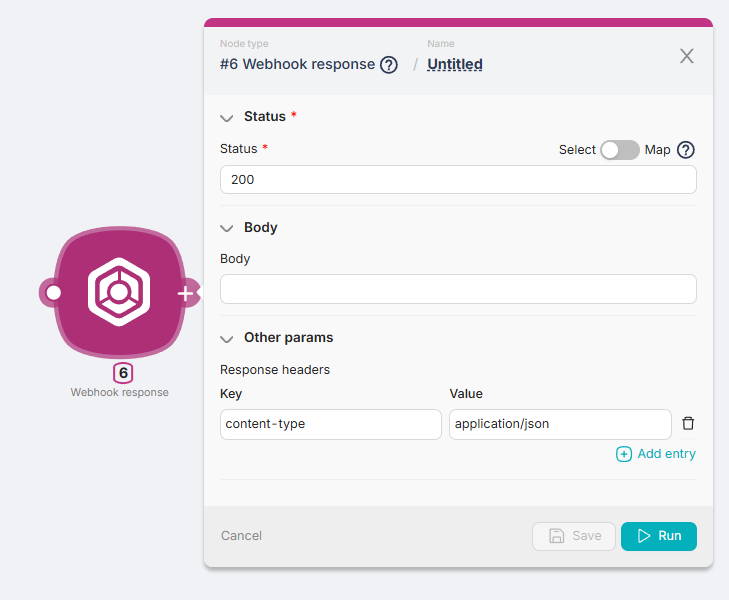
To configure the Webhook Response node, you need to fill in both required and optional fields.
The only required***** field is:
- Status.
Status
This field is used to input the response code to the request from the previous node. For example, a response code like 200.
Body
The response field generated by the Webhook Response node when it receives a response code from the Status field of the previous node.
In the Body field, you can input text, variables from other nodes, or response parameters from other nodes.
Other Params
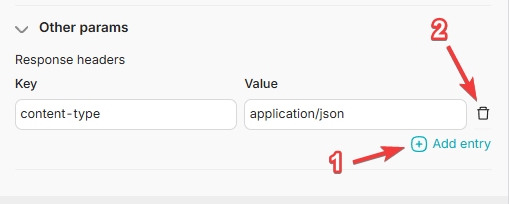
A section of fields for filling in response headers:
- Key - a field to enter additional information about the response, such as the format, e.g., content-type;
- Value - a field to enter the value of additional information about the response, such as the format value, e.g., application/json.
To add a new Key-Value pair, you can use the Add a header button (1). To remove a Key-Value pair, you can use the Remove button (2).