
September 23 - Platform Updates
Highlights
- AI Builder writes a plan before it builds and keeps a task tracker in the chat
- The builder chat is now interactive: questions with answer options, free-text questions, and action confirmations
- Pay as You Go now works on prepayment: top up your balance and set automatic recharge
- New apps: Brainbase Labs, Runware, ThriveCart
Features
AI Builder plans the work before it builds
Before the build starts, AI Builder drafts a plan and puts it on the canvas as a card. The card stays there even after you clear the chat and start a new session.
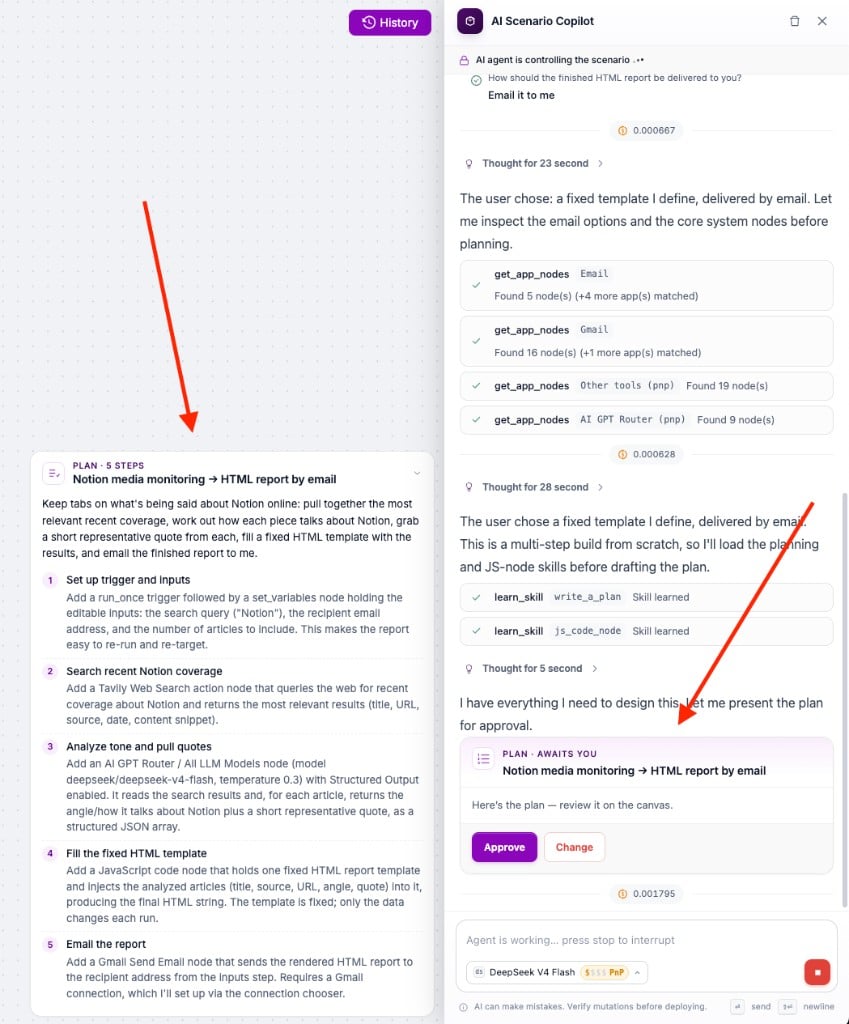
- Approve starts the build, Change lets you adjust the plan first
- During the build the chat turns into a task tracker and marks each step as done
The builder chat is now interactive
AI Builder now asks with cards instead of plain text:
- Questions with answer options - pick a numbered option or write your own
- Questions with a free-text answer - for things only you know, such as a recipient address
- Quick actions - confirm before the builder runs a real action, such as sending an email
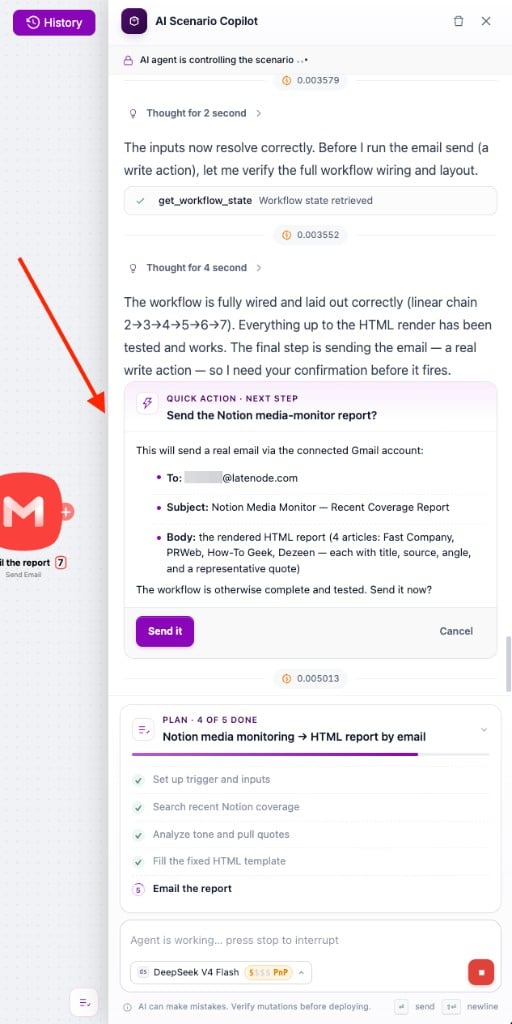
Each question card has a Decide for me button if you would rather let the builder choose.
Pay as You Go: prepayment and automatic recharge
Pay as You Go now runs on prepayment.
- Set how much to add and at which balance. By default: $10 once the balance drops below $1. Minimum $10, larger amounts in multiples of $5.
- The first time you go past the free limit, the recharge runs immediately.
- Top up balance at the top of the Pay as You Go card adds any amount from $10 (multiples of $5) right away, with no redirect to Stripe. It stays inactive until Pay as You Go is on.
New Apps & Updates
New apps:
- Brainbase Labs - cloud platform for AI agents
- Runware - one API for image, video, audio, and 3D generation
- ThriveCart - checkout pages and carts for digital products
Bug Fixes
- Billing - fixed the error that hid the Billing page for some users
- Gmail - the node now returns a readable error when the connection has expired, instead of a raw SSL message
- JavaScript node - fixed the missing error message when the AI assistant quota is exhausted
October 7 - Platform Updates
Updates from October 7, 2026
September 9 - Platform Updates
Updates from September 9, 2026
Need Help? Ask the community
If something on this page is missing or unclear, post on the Latenode community forum. Our team and other users usually reply quickly.
0/100
0/2000