
Connect via MCP
The Latenode Tables MCP server gives an AI agent direct access to the data in your workspace. Once connected, you can ask Claude, Cursor, or Windsurf to find rows, add a record, or update a table with a regular chat message.
To connect, you need a separate MCP server URL that you create in the settings, not an API token.
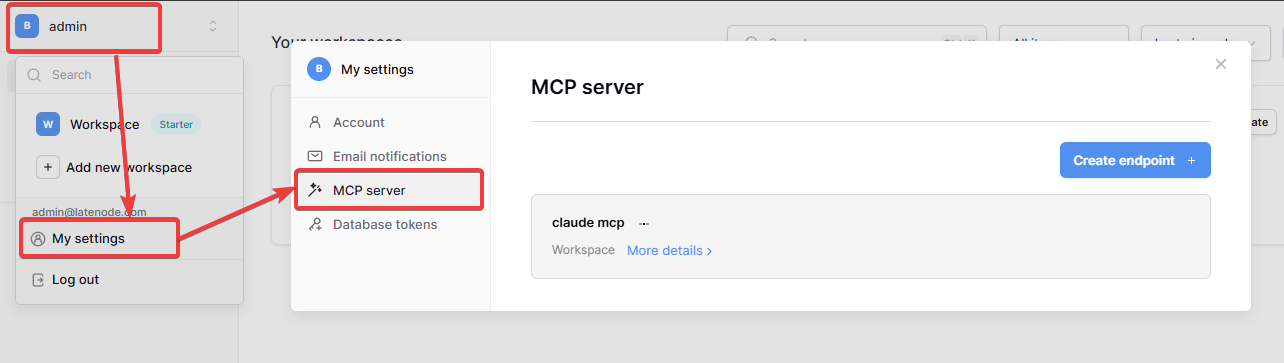
Create an endpoint
Open the settings
On table.latenode.com, click the workspace name in the top left corner and select My settings.
Go to MCP server
In the left menu, open MCP server and click Create endpoint.
Enter a name
Name the endpoint so it's clear which agent it's for, for example Claude work. The endpoint is tied to the workspace.
Copy the URL
Click More details on the endpoint. The URL looks like this: https://table.latenode.com/mcp/…/sse. Show the full URL and copy it with the button next to the field.
The URL works like a password
Anyone with this URL can read and change data in your tables. Don't publish it or share it in open chats.
Connect the agent
Paste the copied URL into your agent's settings. Below the URL, the same window has Claude, Cursor, and Windsurf tabs with ready-made instructions for each client.
- Open Claude Desktop settings.
- Go to the Developer tab and click Edit Config.
- Add the configuration to
claude_desktop_config.jsonwith your URL:
{
  "mcpServers": {
    "Latenode Tables MCP": {
      "command": "npx",
      "args": [
        "mcp-remote",
        "https://table.latenode.com/mcp/YOUR_URL/sse"
      ]
    }
  }
}- Restart Claude Desktop.
Open the Cursor or Windsurf tab in the MCP server section and copy the configuration from there: the URL is already filled in.
After connecting, test it with a simple request, for example: "Show the list of tables in my database".
Latenode Tables MCP and Latenode MCP
These are two different servers. The Latenode MCP server works with scenarios: it creates, edits, and runs them. The Latenode Tables MCP works with data in tables. You can connect both to the same agent.
Get an API token
How to create a database token in Latenode Tables and where to use it
Nodes in scenarios
How Latenode Tables nodes read and change rows from a Latenode scenario
Need Help? Ask the community
If something on this page is missing or unclear, post on the Latenode community forum. Our team and other users usually reply quickly.