
Bun
Node Description
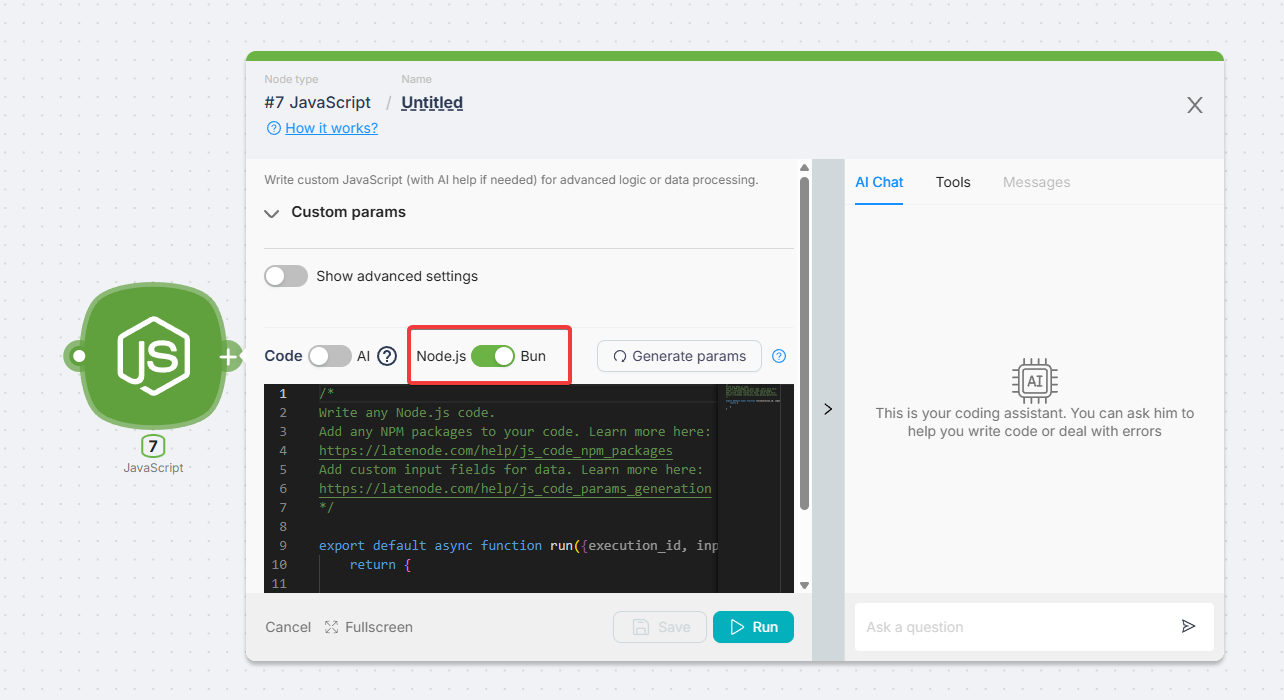
The Bun runtime executes JavaScript code inside automation scenarios.
It is largely compatible with Node.js, but provides higher performance and additional built-in features such as SQLite, a fast package manager, and improved APIs.
In the low-code environment, Bun works the same way as Node.js — through the JavaScript node, with a runtime switch available in settings.
Adding Code to a Scenario
To add Bun code:
- Add a JavaScript node to your scenario.
- In the node settings, switch the runtime to Bun.
- Edit the code template manually or with AI assistance.
Data Exchange Between Nodes
Using Data from Previous Nodes
You can access output data from previous nodes via the data object:
export default async function run({ data }) {
  const username = data["{{1.body.user}}"];
  return { user: username };
}
Passing Processed Data to Subsequent Nodes
A Bun node can return strings, numbers, JSON objects, or arrays:
export default async function run() {
  return {
    status: "ok",
    count: 42,
  };
}
Using NPM Packages
Bun supports importing npm libraries with the import statement.
Dependencies are installed automatically after saving the scenario.
import axios from "axios";

export default async function run() {
  const response = await axios.get("https://api.github.com/repositories");
  return { total: response.data.length };
}
Some libraries may behave differently in Bun than in Node.js. Always check compatibility.
Bun-Specific Features
SQLite Support
Bun provides a built-in bun:sqlite module:
import { Database } from "bun:sqlite";

export default async function run() {
  const db = new Database(":memory:");
  db.run("CREATE TABLE users (id INTEGER, name TEXT)");
  db.run("INSERT INTO users VALUES (?, ?)", [1, "Alice"]);

  const row = db.query("SELECT * FROM users").get();
  return { user: row };
}
Logging
Use console.log for debugging. Output will appear in the Log tab.
Limitations in Low-Code Environment
The environment is isolated: listening to ports, running HTTP/WebSocket servers, or background daemons is not possible.
- Maximum execution time: 2 minutes
- Only JavaScript is supported. TypeScript/JSX syntax (
: type, interfaces, generics) is not available - Use
importinstead ofrequire - Some Node.js core modules are not supported
- Not all npm packages are guaranteed to work
Bun.serveand any server creation are not supported
Node.js
Previous Page
Headless browser
Automating web interactions and UI testing using a headless browser
Need Help? Ask the community
If something on this page is missing or unclear, post on the Latenode community forum. Our team and other users usually reply quickly.