
Billing
Plans & Pricing is where you manage Latenode billing. Latenode uses Pay as You Go: you pay for CPU seconds (compute time your scenarios use) and optional add-ons, with no fixed monthly platform fee after you subscribe. Open Plans & Pricing from the left menu to see your balance, upgrade from Free, and manage payments.
Quick start
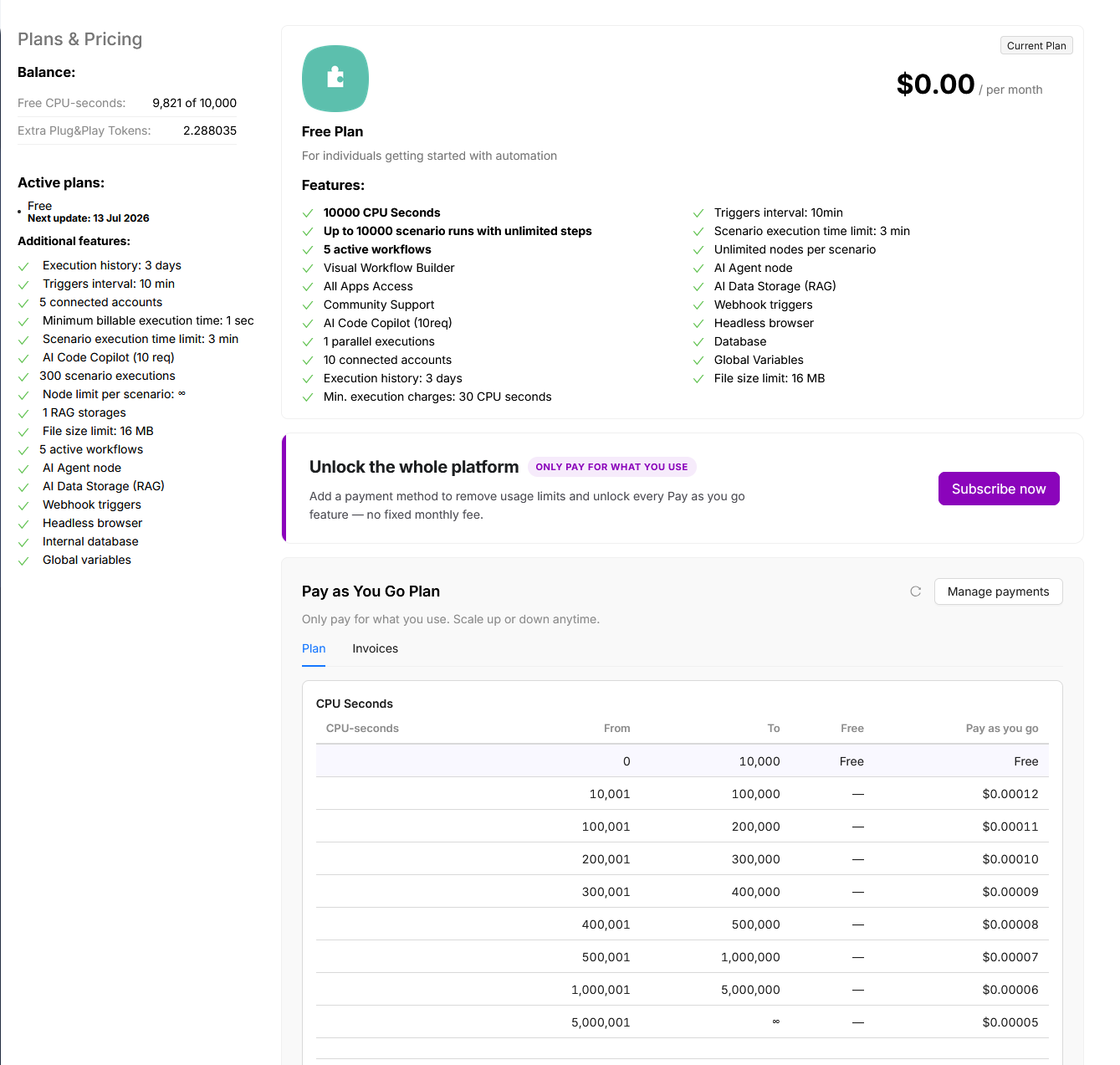
- On Free: you get 10,000 CPU seconds per month. Check Free CPU-seconds in the left sidebar (
X of 10,000). - Need more: click Subscribe now on the unlock banner, add a payment method, and activate Pay as You Go. You only pay for what you use above the free tier.
- Track usage: open Usage Statistics and the Invoices tab on this page.
- Optional: set a spending limit for CPU seconds or Plug&Play Tokens so costs cannot exceed a dollar amount you choose.
New to CPU seconds? Read What Are CPU Seconds?.
Legacy subscriptions
This page describes Pay as You Go billing. If you still see monthly plans (Micro, Starter, Grow, Prime), credits, Boosts, or Extra Credits, you are on a legacy subscription. See Legacy billing (archive) at the bottom of this page.
Free plan
The Free plan costs $0.00 per month and is for getting started with automation.
| Feature | Free plan |
|---|---|
| CPU seconds | 10,000 / month |
| Scenario runs | Up to 10,000 (unlimited steps per run) |
| Active workflows | 5 |
| Parallel executions | 1 |
| Connected accounts | 10 |
| Trigger interval | 10 min |
| Scenario execution time limit | 3 min |
| Execution history | 3 days |
| Min. charge per execution | 1 CPU second |
The left sidebar shows your remaining Free CPU-seconds and any Extra Plug&Play Tokens (including the welcome token from registration).
To unlock Pay as You Go features (unlimited active scenarios, longer history, more parallel executions, and more), use the Unlock the whole platform banner and click Subscribe now.
Pay as You Go plan
After you subscribe and attach a valid payment method, you move to Pay as You Go. There is no fixed monthly platform fee; you pay for CPU seconds beyond the free tier and for any add-ons you enable.
CPU seconds pricing
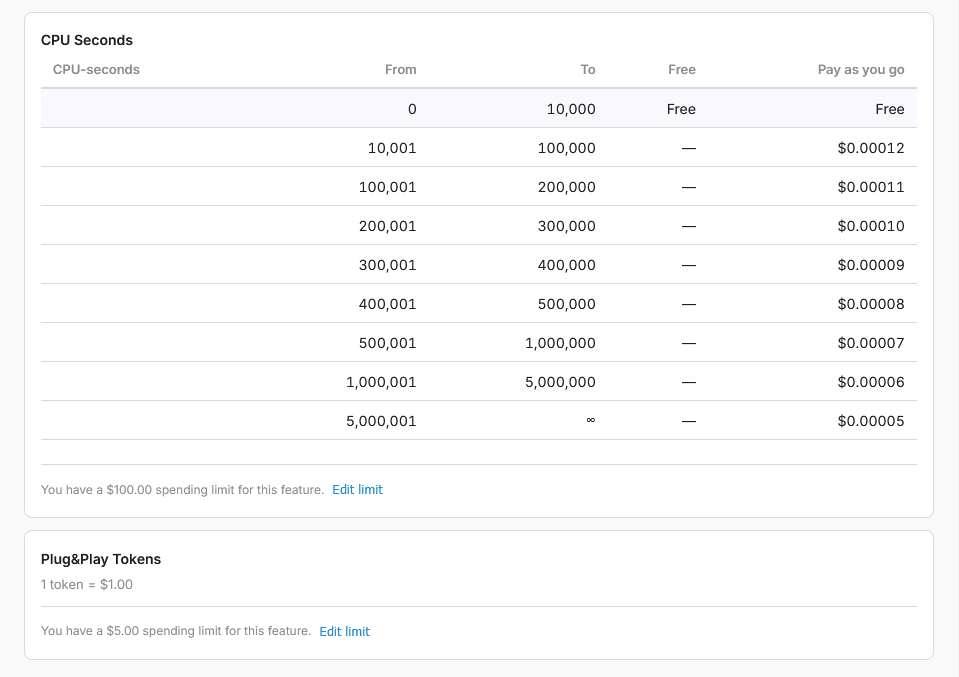
The first 10,000 CPU seconds each month are free. Usage above that is billed per second at tiered rates (the more you use, the lower the per-second price):
| From | To | Price per CPU second |
|---|---|---|
| 0 | 10,000 | Free |
| 10,001 | 100,000 | $0.00012 |
| 100,001 | 200,000 | $0.00011 |
| 200,001 | 300,000 | $0.00010 |
| 300,001 | 400,000 | $0.00009 |
| 400,001 | 500,000 | $0.00008 |
| 500,001 | 1,000,000 | $0.00007 |
| 1,000,001 | 5,000,000 | $0.00006 |
| 5,000,001 | ∞ | $0.00005 |
Under the table, open Set limit to cap how much you can spend on CPU seconds in a period. If you hit the limit, scenarios do not start until you raise or remove it.
Plug&Play Tokens
Plug&Play Tokens are billed separately from CPU seconds. Rate: 1 token = $1.00. PnP usage is charged on top of scenario CPU seconds. You can set a separate spending limit for tokens. See What Are PnP Tokens?.
Included with Pay as You Go
When subscribed, you get higher defaults than Free (before add-ons):
- 5 parallel executions (base; add more via add-on)
- 10 min max execution time per run
- 30 days execution history
- Unlimited active scenarios
- Unlimited connected authorizations
- 16 MB file size limit per execution (expandable)
- 1 RAG AI Knowledge Storage, 50 RAG chunking pages
- Global variables, 1 workspace invite
Add-ons
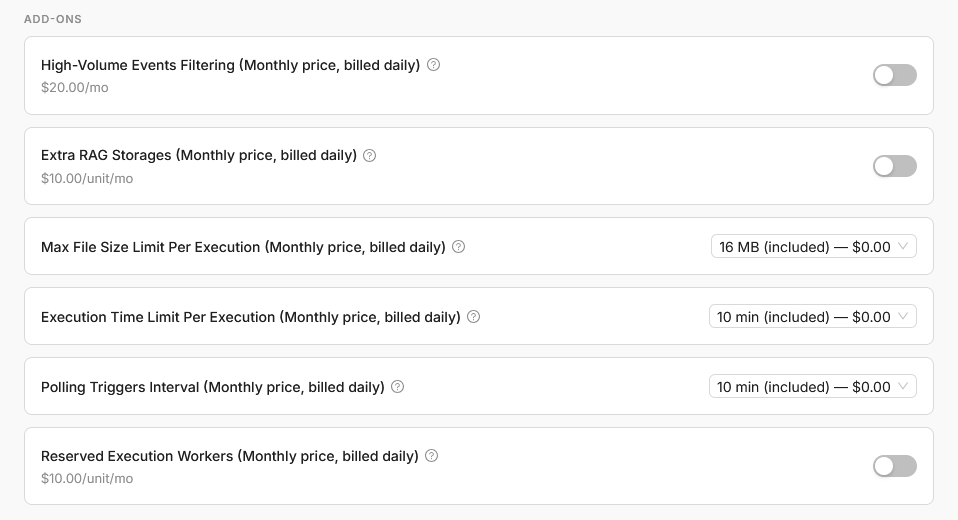
Add-ons customize limits and features. Each shows (Monthly price, billed daily): you are charged one thirtieth of the monthly price per day while the add-on is active.
| Add-on | Price |
|---|---|
| High-Volume Events Filtering | $20.00/mo |
| Extra RAG Storages | $10.00/unit/mo |
| Max File Size Limit Per Execution | From 16 MB (included) up to larger sizes |
| Execution Time Limit Per Execution | From 10 min (included) up to longer limits |
| Polling Triggers Interval | From 10 min (included) down to 1 min |
| Reserved parallel executions | $10.00/unit/mo |
The Reserved parallel executions add-on increases how many scenarios can run at the same time. Pay as You Go includes 5 parallel executions by default; each add-on unit adds one more. This limit applies to your whole account rather than to a single scenario: see Parallel execution limit.
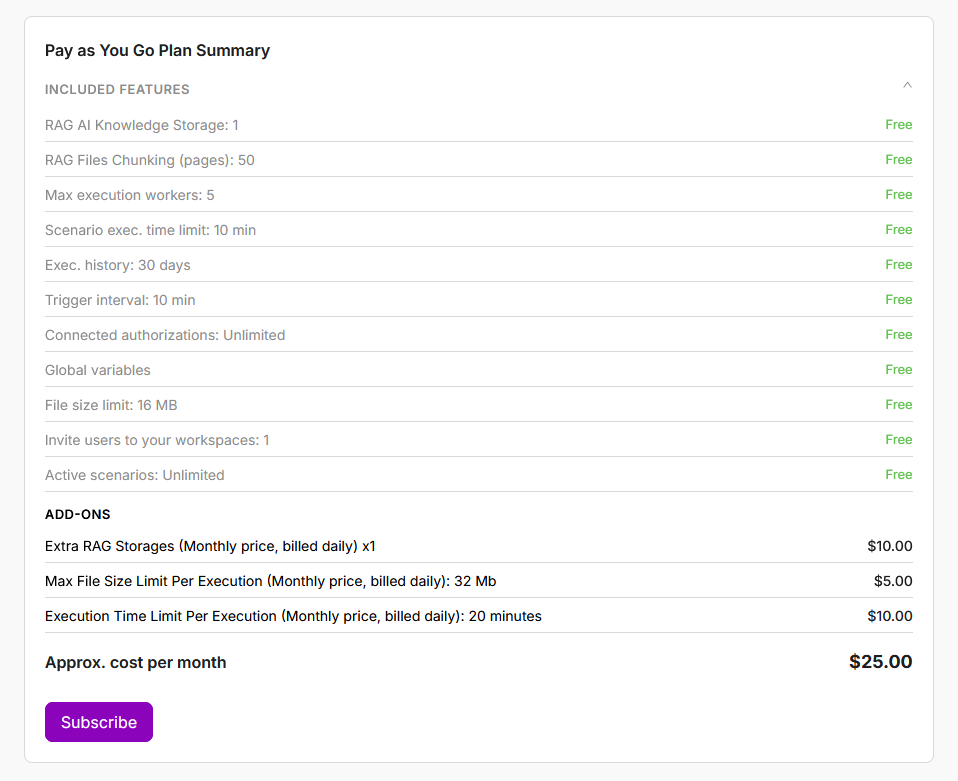
Approx. cost per month at the bottom sums selected add-ons plus projected CPU and PnP usage. The total updates as you change add-ons or limits.
Subscribe to Pay as You Go
Choose add-ons (optional)
On the Pay as You Go Plan section, toggle add-ons or change dropdown limits. Approx. cost per month updates as you select options.
Click Subscribe
Click Subscribe. You are redirected to attach a payment method (card via Stripe).
Confirm activation
The subscription activates only if the card is valid and the first-day charge for selected add-ons succeeds. If payment fails, the subscription is not created and you stay on Free.
Update your configuration
Change add-ons or limits anytime and click Update. Latenode charges the first day of the new configuration immediately. If that charge fails, the plan stays on the previous settings.
Projected Usage next to an add-on shows how much that add-on is expected to cost through the end of the current billing month, including any plan changes you already made.
Payments and invoices
The Pay as You Go Plan section has two tabs: Plan and Invoices. Click Manage payments (top right of the section) to open Stripe and manage cards on file.
Invoices tab
The Invoices tab lists charges and payment status. If a wallet top-up invoice fails, use Retry on that row to try again.
Unpaid invoices
If unpaid invoices exceed the platform hard limit (default $2 total failed charges), your Pay as You Go subscription is cancelled and you return to the Free plan. Unpaid invoices remain listed. Pay them (use Retry where available) before you can Subscribe again.
Latenode may charge small amounts during the month as usage grows (for example when accumulated usage passes internal thresholds) so your balance stays current. At the end of each billing period, remaining usage is settled on your invoice.
Cancel or lose subscription
If your subscription is cancelled (by you in Stripe or due to failed payments), Pay as You Go add-ons and limits stop. The page shows the Free plan and Subscribe again. You may see a $0.00 invoice row when a subscription ends; that is a billing system record and does not require payment.
LTD and welcome tokens
- Welcome Plug&Play Token: one token is granted at registration. PnP usage draws from this balance before billable usage is reported.
- LTD (lifetime deal): a one-time purchase that includes a fixed allowance of CPU seconds and PnP tokens. You do not need a Pay as You Go subscription to use your LTD balance. If you need more than LTD covers, you can subscribe to Pay as You Go in addition. Usage draws from LTD first, then from Pay as You Go.
LTD (lifetime deal)
An LTD is not a monthly subscription. Your LTD allowance works the same as before: 1 credit equals 30 CPU seconds, including the usual minimum charge per execution. In the UI, credits are now shown as CPU seconds; the underlying limits did not change.
Bonus CPU seconds and tokens
The Latenode team may add bonus CPU seconds or Plug&Play Tokens to your account (for example as part of a promotion, campaign, or support offer). Bonus balances stay on your account until you use them. They do not reset at the end of a Pay as You Go billing period and are not tied to the monthly usage cycle.
What Are CPU Seconds?
How CPU seconds are counted and how they differ from Duration.
Usage Statistics
Analyze scenario execution usage over time.
Legacy billing (archive)
The guides below describe the previous billing model: monthly plans (Micro, Starter, Grow, Prime), execution credits, Boosts, and Extra Credits. Use them only if your account still shows that UI.
Account Settings
Manage your account data, change email, and delete your account.
Workspace Management
Manage your workspace settings, ownership, and lifecycle.
Need Help? Ask the community
If something on this page is missing or unclear, post on the Latenode community forum. Our team and other users usually reply quickly.