
Version History
Version history is the list of saved states of a scenario. Each save creates a new version in the Development branch. One of the versions can be published to the Production branch for live runs. The version list lets you switch between scenario states and, if needed, roll back Production to an earlier version.
Where the version list is
The version list appears on the scenario page (a dropdown with versions). It lists Development versions and marks which one is deployed to Production.
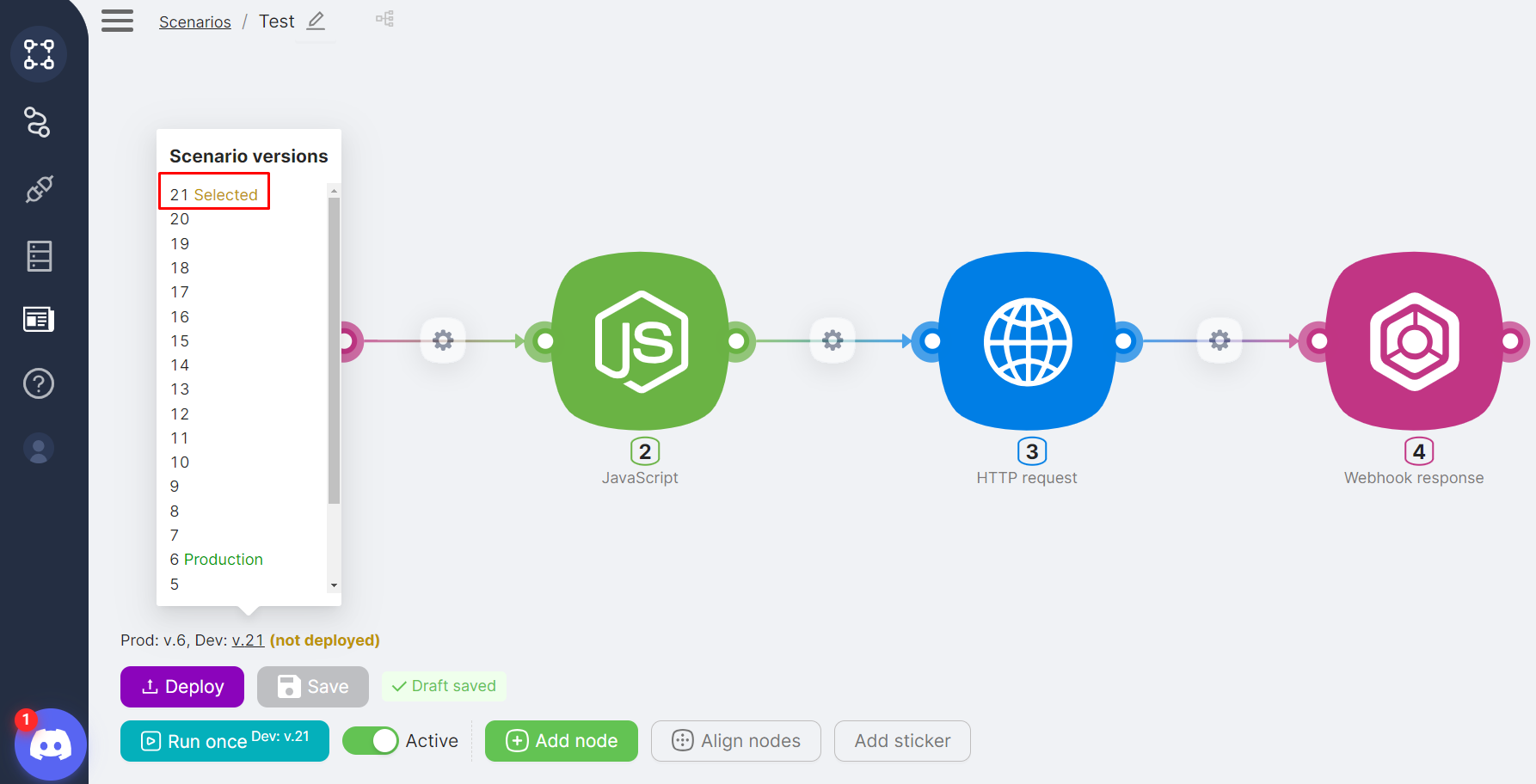
- Selected — the version currently selected (the one you are viewing or editing).
- Production — the version deployed to the Production branch (the one that runs in production when triggers fire).
Creating versions, deploying, and rollback
A new version is added when you click Save; publishing to Production and rolling back to an earlier version are done via Deploy. For step-by-step instructions with screenshots, see Deployment and scenario branches on the Building scenarios page.
What's next
- Building scenarios — saving, running, deployment, and branches
- Execution History — viewing past scenario runs
Execution History
How to view, analyze, and debug past scenario runs.
Publishing Scenarios
How to publish a scenario to Production with Deploy and turn it on for live runs.
Need Help? Ask the community
If something on this page is missing or unclear, post on the Latenode community forum. Our team and other users usually reply quickly.