
How Latenode works
Latenode is a platform for building automations using a visual builder. Automations here are called scenarios and are made up of nodes. Both concepts are explained below.
What is a node?
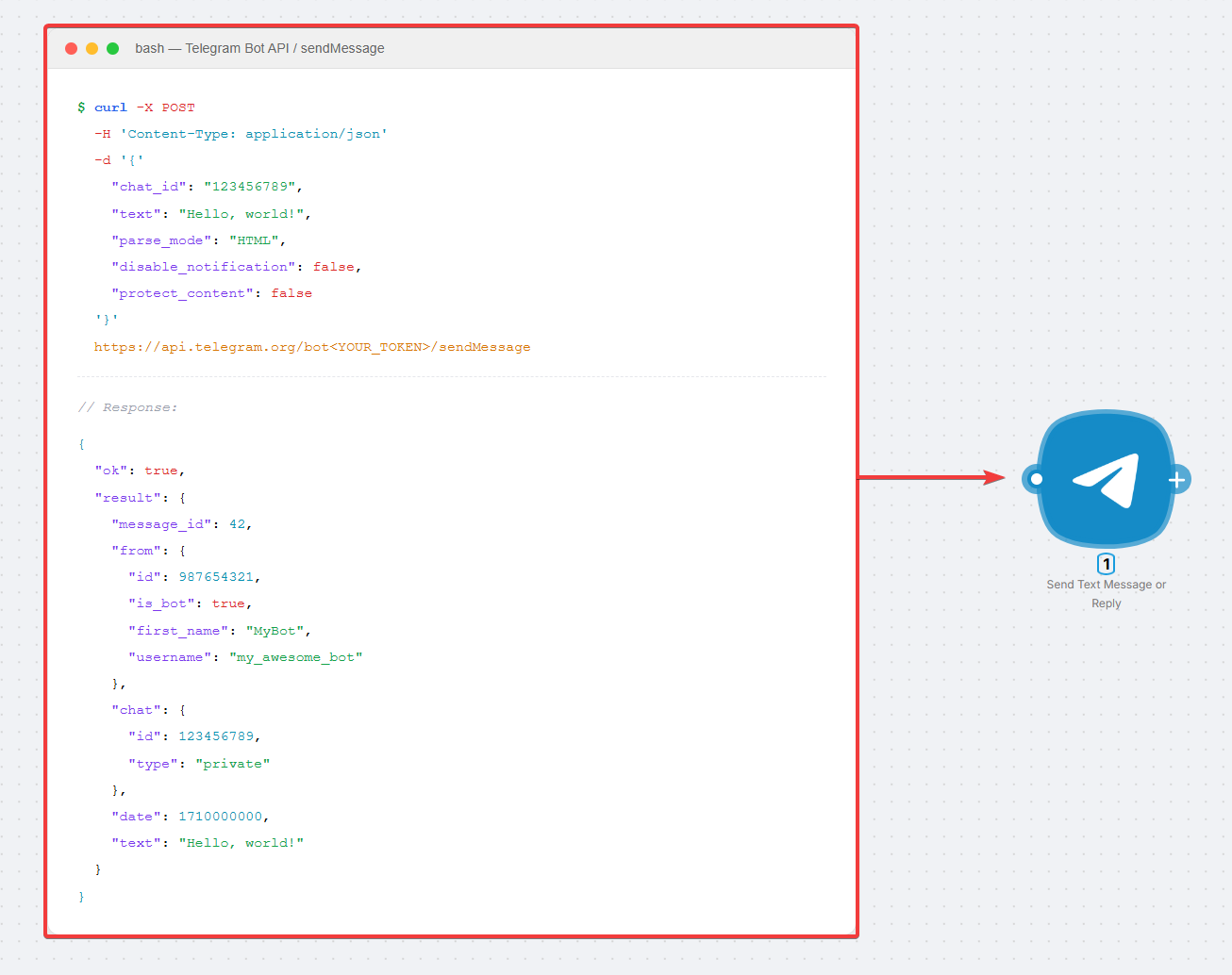
Any application on the internet exchanges data and commands through an API. An API is a set of endpoints: each endpoint is a piece of code that does one specific thing (send a message, create a record, fetch a list).
A node in Latenode is that endpoint wrapped in a block with clear, labeled fields. Instead of working with code, you pick the block, fill in the parameters, and connect it to the next node. On a run the node performs one step and passes the result to the next node.
Below: the same action in raw API docs and in the Latenode builder.
Two node types: trigger and action
Nodes fall into two types. They answer different questions in the same chain.
Trigger: when should it run?
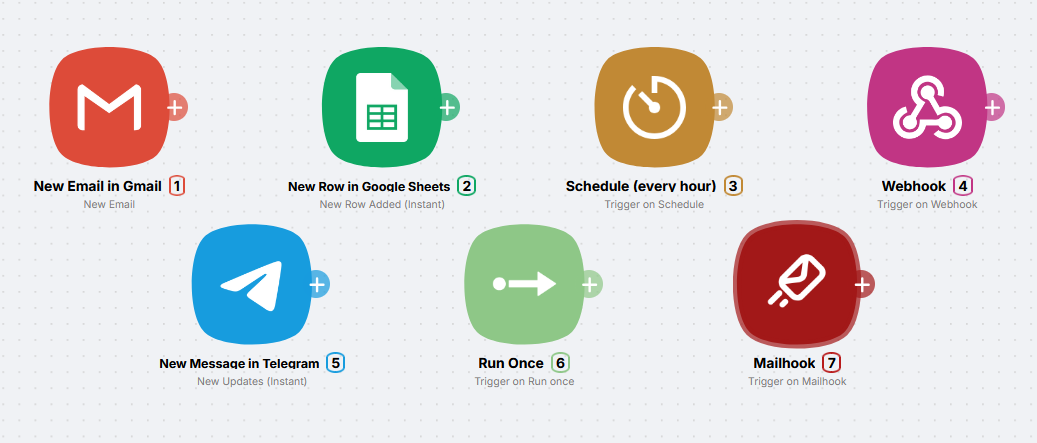
A trigger is the first node in a scenario. It defines when the chain should run: email arrived, schedule fired, webhook received.
Examples of triggers:
- New Gmail message
- Mailhook
- New row in Google Sheets
- Schedule (every day, every hour)
- Webhook (incoming HTTP request)
- New Telegram message
Instant and Polling: two trigger modes
App triggers (Gmail, Telegram, Google Sheets, and others) show their mode through an icon next to the trigger name.
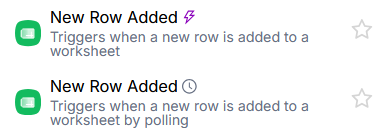
Instant (lightning bolt) - the external service pushes the event to your scenario's webhook the moment it happens. The scenario runs in real time, with virtually no delay.
Polling (clock) - Latenode polls the external service on a schedule, checking for new events. Unlike some other platforms, polling does not cost extra. The interval is set by the Trigger interval parameter in your plan settings.
Some apps, like Google, offer both variants in the trigger list depending on the event you choose.
Action: what happens next?
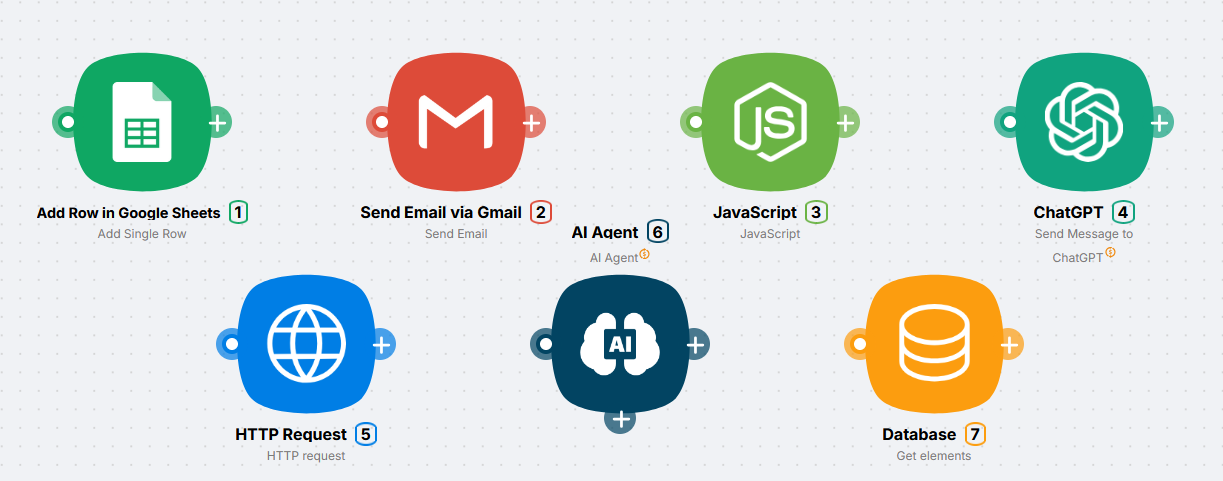
An action is every node after the trigger. Each one performs one job on its step: send a message, append a row, call an AI model.
Examples of actions:
- Send a Telegram message
- Add a row to Google Sheets
- Send an email
- Call an AI model
- Run an AI Agent
- Run JavaScript
- Query the built-in database
- Send an HTTP request
Worth noting separately: Plug-n-Play (PnP) actions - nodes for text generation, image generation, audio, data enrichment, and hundreds of other services. They run through a single Latenode account: no API keys or external accounts required. Learn more about PnP nodes
Any scenario that must start on its own begins with a trigger. Without one, the scenario will not run automatically.
What is a scenario?
A scenario is a chain of nodes connected to each other. Each node is one step: it receives data, does its job, and passes the result to the next node. The scenario starts automatically when the first node fires (a trigger).
Examples:
- New email → append a row to a sheet → notify Telegram
- Every day at 9:00 → gather news → send an email digest
- New form submission → AI check → create a CRM task
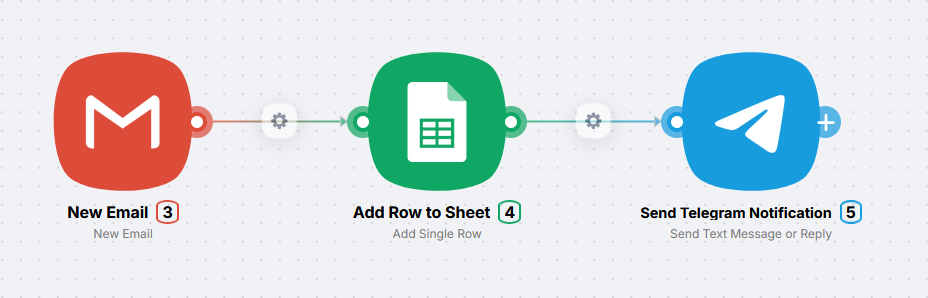
How a scenario runs
When the trigger fires, Latenode runs nodes in sequence along the connections: each one receives the previous result, does its job, and passes data to the next.

- The trigger waits for the event (email, time, webhook, and so on).
- The event occurs - the trigger passes data to the first action.
- Each following node reads the previous output, runs its job, and passes the result onward.
- The run ends when every node on the path has finished.
Here is what it looks like in the interface:
What's next?
Template gallery
Copy a ready-made scenario from the gallery and adjust authorizations and settings.
Your first scenario in 15 minutes
Build a morning news digest in 15 minutes with no code and no API keys.
Need Help? Ask the community
If something on this page is missing or unclear, post on the Latenode community forum. Our team and other users usually reply quickly.