
How to Plan a Scenario
Before you open the builder, spend five minutes planning. The clearer you are about what should happen, the faster you will build the scenario and the less you will need to redo.
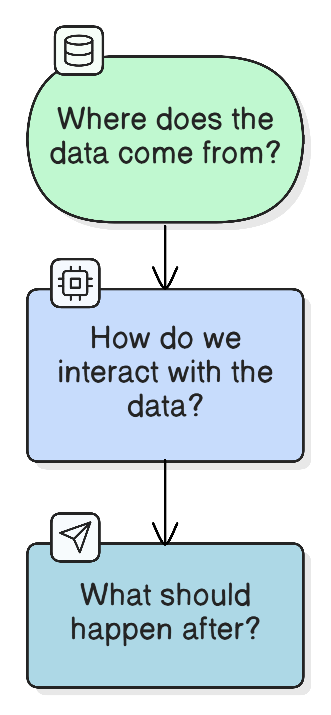
Start with the idea
Not with a trigger, not with nodes: start with the result you want.
Take your task and write it in one sentence:
"When a new request comes in, the manager should immediately get a Slack notification with the customer name and amount."
"Every morning I want to receive an email digest of news on my topic."
"New leads from the form should automatically go to CRM with a filled-in profile."
Got the idea? Good. Now break it into parts.
Step 1. What should trigger the scenario?
Find the starting event: the thing after which everything begins.
- Someone filled out a form on the website
- A new email arrived
- Every day at 9 AM
- A new row appeared in a spreadsheet
If there is no starting event, the scenario will not run automatically.
Step 2. What sequence of actions is needed?
Write out step by step what should happen from start to finish. Don't think about nodes yet: just verbs.
New form submission → Find contact in CRM by email → Update profile → Notify manager in SlackEvery day at 9:00 → Collect news via Perplexity → Send digest by emailStart with what you understand. The sequence will become clearer as you go.
Step 3. Where will the required data come from?
This is the most important question. Every node receives data from the previous one. If data is missing, the node will not work.
Go through each step and ask: what does this node need and where will it come from?

Required fields in a node's settings are marked with a red asterisk. Without them the node will throw an error on every run. If a required field has no data source, the chain is missing an intermediate step.
Example: from the obvious solution to the correct one
Here is how to think through this in practice.
Task: when a webhook receives contact data, update the contact in HubSpot (the same logic applies to any CRM).
First thought:
[Webhook] → [HubSpot: Update Contact]Makes sense, but it will not work. The Update Contact node has a required field: contact_id. The platform does not know which contact to update.
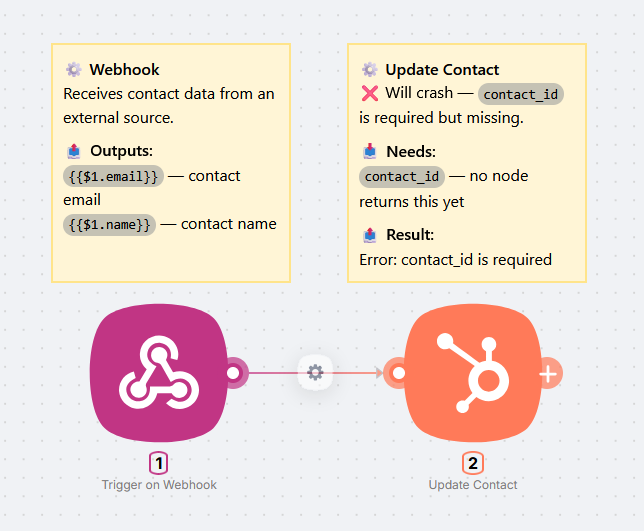
Second thought: add a lookup:
[Webhook] → [HubSpot: Find Contact] → [HubSpot: Update Contact]Better. But there is still a problem: what if a contact with that email does not exist in the CRM yet? Find Contact will return an empty result and Update Contact will fail with an error.
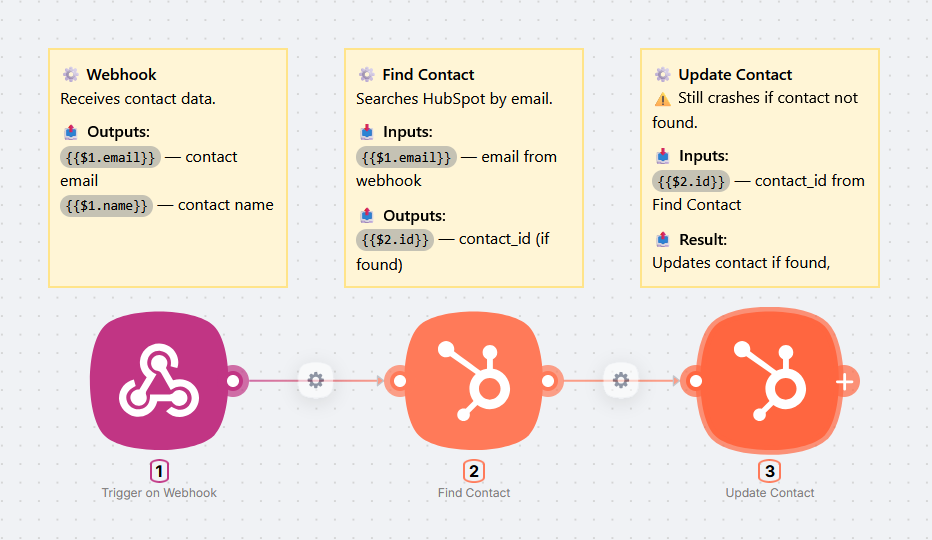
Correct solution: handle both cases:
[Webhook] → [HubSpot: Find Contact]
                → contact found:
                    [HubSpot: Update Contact]
                → contact not found:
                    [HubSpot: Create Contact] → [HubSpot: Update Contact]
Now the scenario works in any situation.
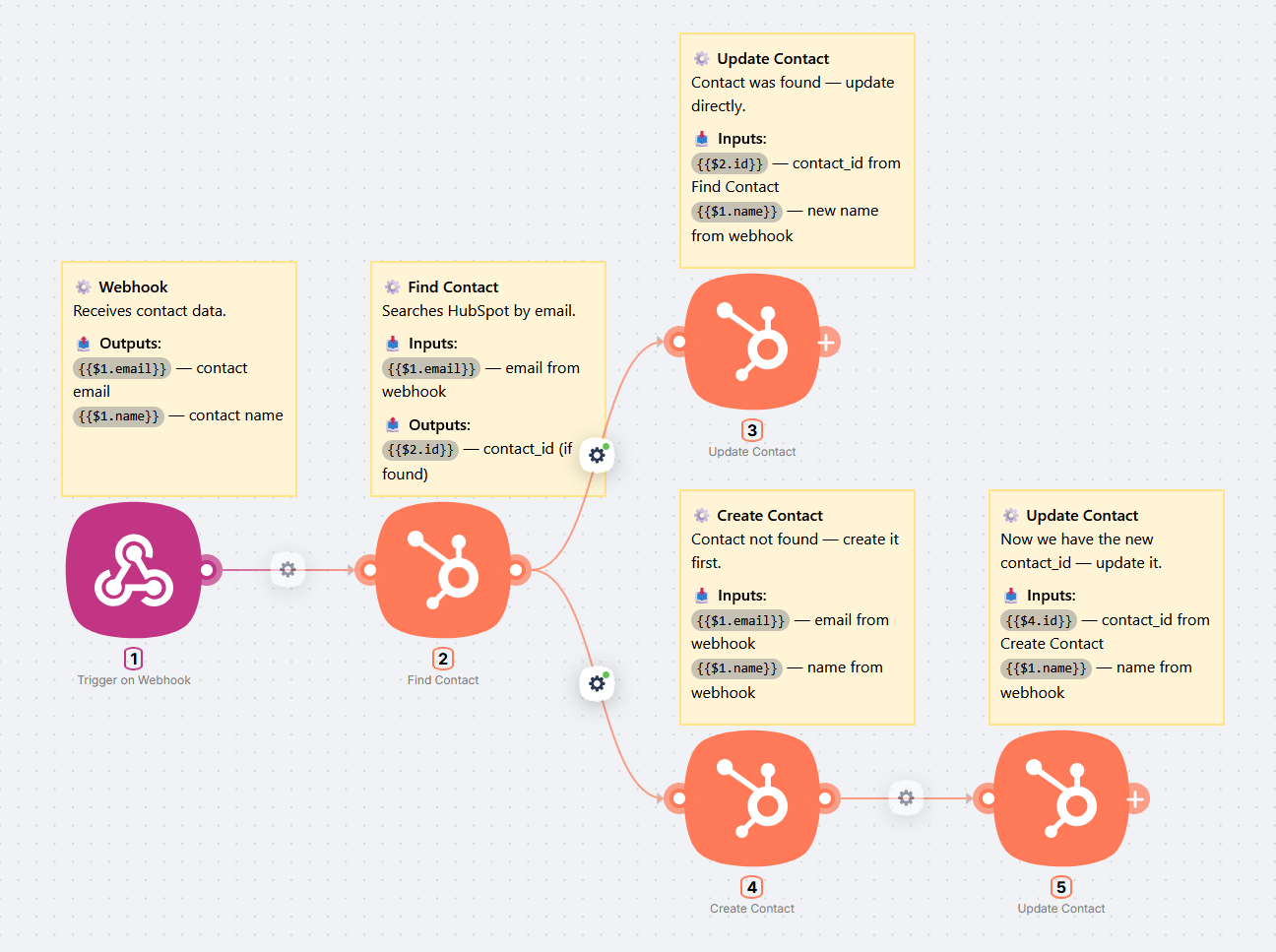
Before placing a node, ask yourself: what happens if the data is missing or not found? That is how you build a reliable chain.
Build an MVP, then expand
Do not try to build the final complex scenario all at once. Start with the minimal chain that works end to end, then add nodes one at a time. Run Run Once after each addition and check the result. That way you always know exactly which step broke.
A complex 10-node scenario is just the same approach repeated 10 times: add a node, verify, move on.
Checklist before you start
- Idea is defined: clear about what should happen in the end
- Trigger is identified: clear about what starts the scenario
- Sequence is written out: steps from start to result
- Data is mapped: each node gets what it needs from the previous one
- Access is confirmed: you can log in to all the apps needed
- Starting with an MVP: minimal chain first, then expand
If all items are checked, open the builder.
What's next?
Your first AI agent in 30 minutes
Build a Telegram bot with AI and web search in 30 minutes - no code required
How to Build a Scenario
Adding nodes, connecting them, the build workflow, and passing data through the DATA tab
Need Help? Ask the community
If something on this page is missing or unclear, post on the Latenode community forum. Our team and other users usually reply quickly.