
Scenario Types
In Latenode you can build any automation: from a simple notification to a complex AI agent with sub-agents. This page covers the five main types and helps you pick the right one.
1. Linear scenarios
Works best when the task always follows the same fixed sequence: the same nodes run in the same order after the trigger, with no data-based branching. This is the simplest type to read and debug.

Examples
- New Google Forms submission → write to Google Sheets → Telegram notification
- New Gmail message → extract data → create task in Notion
- Every day at 9:00 → fetch CRM data → post report to Slack
A linear scenario works well when input and output are predictable: the same services, one chain, no branching. If a meaningful fork appears, see sections 2 (conditions) and 3 (AI).
Example scenario
Automatic lead enrichment
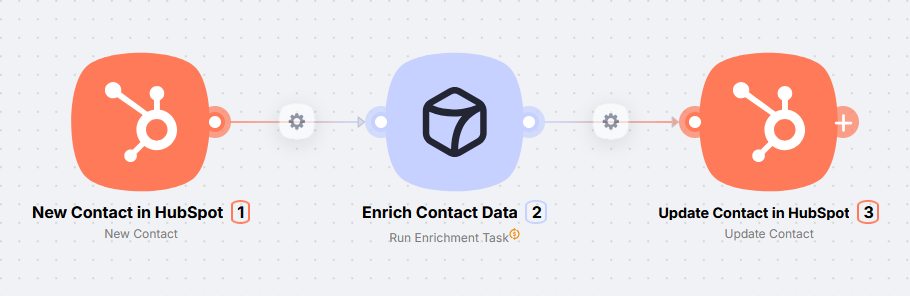
A new CRM contact is enriched with company name, job title, and team size. The manager opens the contact card and sees the full profile without manually browsing websites or directories.
2. Conditional scenarios
Use when the outcome depends on structured fields (amount, country, status, threshold, flag): different values should trigger different branches of actions.
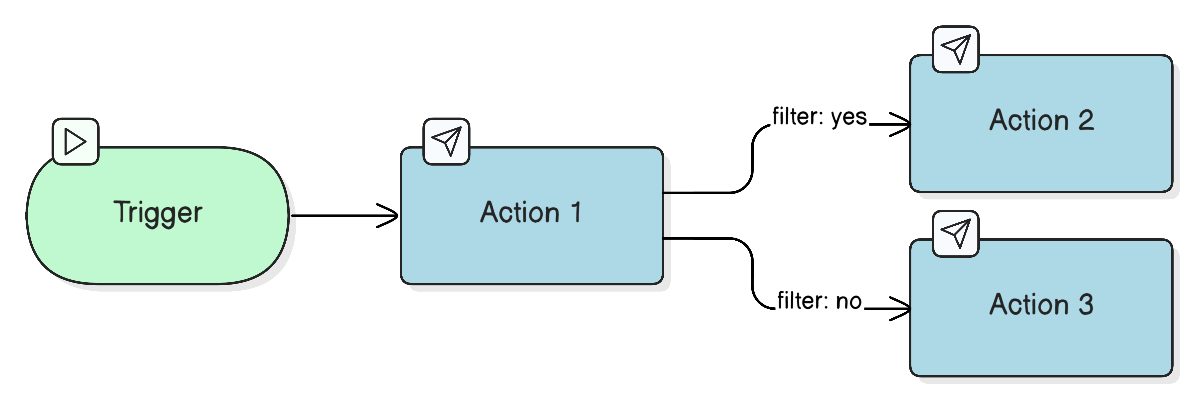
Examples
- New request → check amount → large amount: notify manager; otherwise: auto-reply to customer
- New contact → country → Russia: CRM A; otherwise: CRM B
- Form lead → classify → hot lead: sales task; otherwise: send materials by email
This type works when the decision depends on clear fields: amount, country, status, score, or a form flag. Multiple branches after a check are fine as long as the condition is based on structured data. If the branch should follow from the meaning of text rather than a table column, see section 3.
Example scenario
Lead qualification by budget
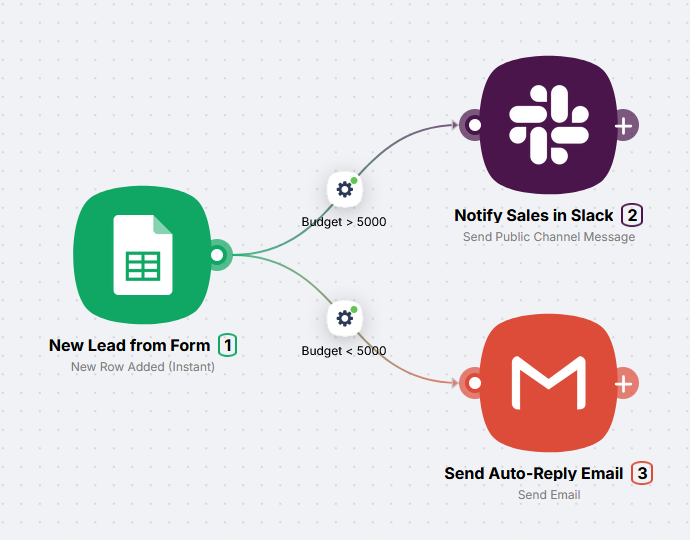
A form row hits a spreadsheet. High-budget leads go to Slack for the manager; below the threshold the customer immediately receives an email offer.
3. AI-based routing
Needed when the branch cannot be reliably set by column rules. You need to evaluate the meaning, tone, or intent of text and route the flow based on the model's answer.
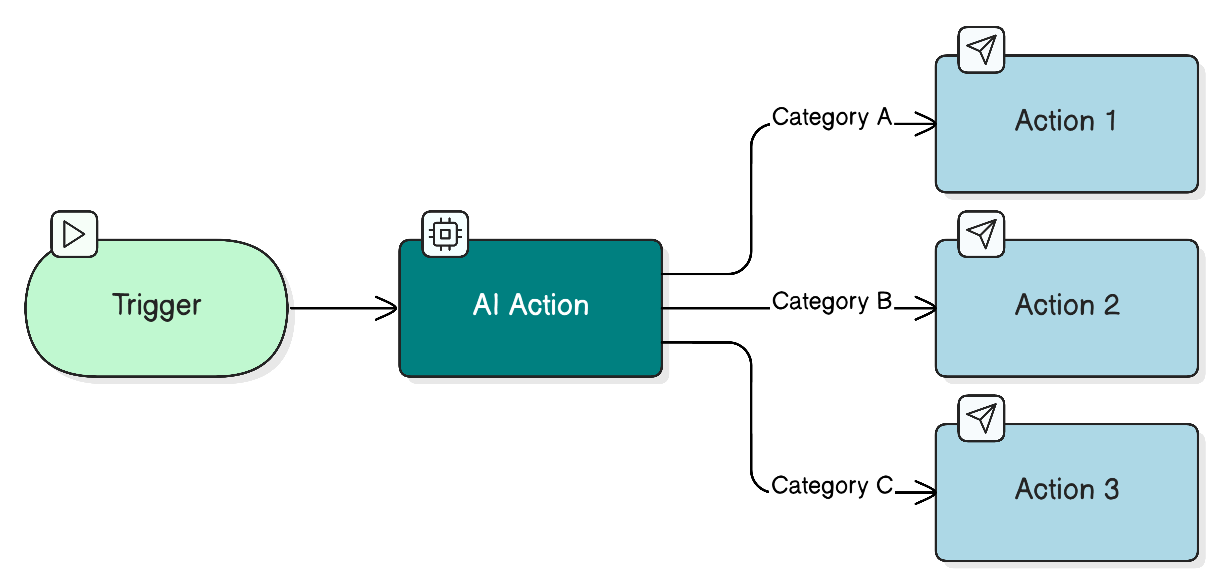
Examples
- Chat or email message → AI: category → different actions (reply, escalate, ignore)
- Website review → AI: tone → negative: manager; positive: marketing
- Request text → AI: product and urgency → write to the right CRM funnel
AI is especially useful when data is unstructured or does not repeat the same pattern: free text, tone, hints, unusual phrasing. When fields don't give a clear answer, the model decides by meaning. In the prompt, define the response criteria and format (one word, JSON, scale) upfront. LLM calls use Plug&Play Tokens on top of scenario CPU seconds.
Example scenario
Anti-spam filter for a Telegram channel
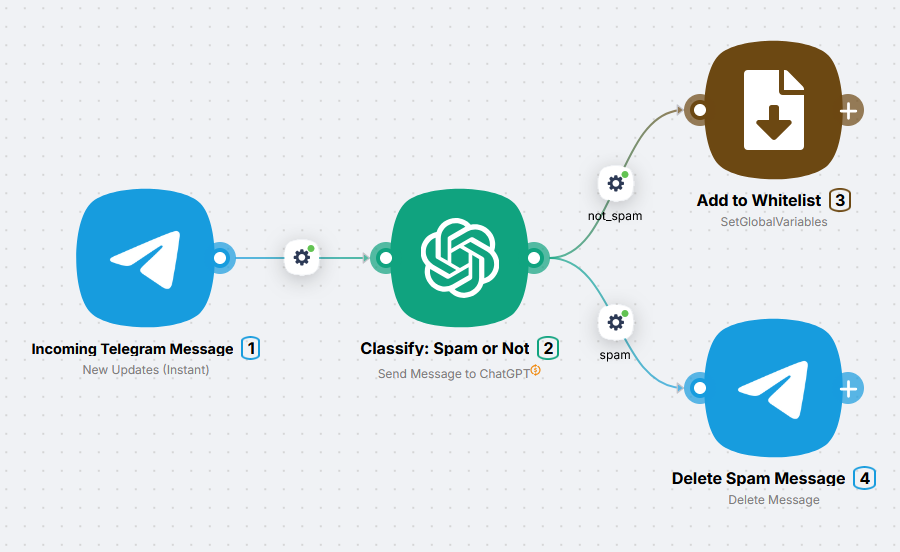
The model evaluates the message by meaning. Normal content leads to adding the user to a whitelist via a global variable; spam is deleted without maintaining a long list of stop words.
4. Agent scenarios
This is the most advanced scenario type. The agent works with unstructured data and on each run picks the right tools from the ones available to it: nodes connected on the canvas. In one run it may call no tools at all; in another it may use several in sequence.
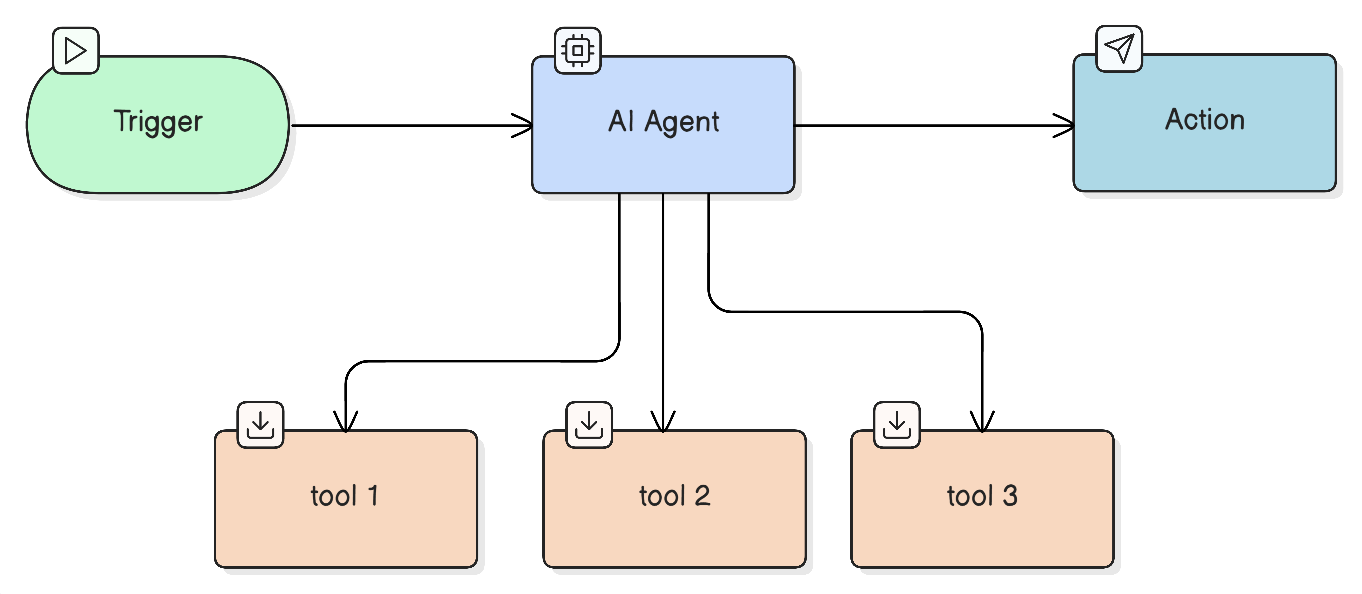
Examples
- Text request from a chat → agent → picks services and call order itself
- Free-form task → agent → gathers data from CRM, spreadsheet, email without a fixed chain
- Customer question → agent → knowledge base and tickets → answer
Connect only the nodes the agent actually needs. The broader the tool list, the more important a precise prompt becomes: without one the agent will call unnecessary tools and run costs will grow.
Example scenario
Personal assistant in Telegram
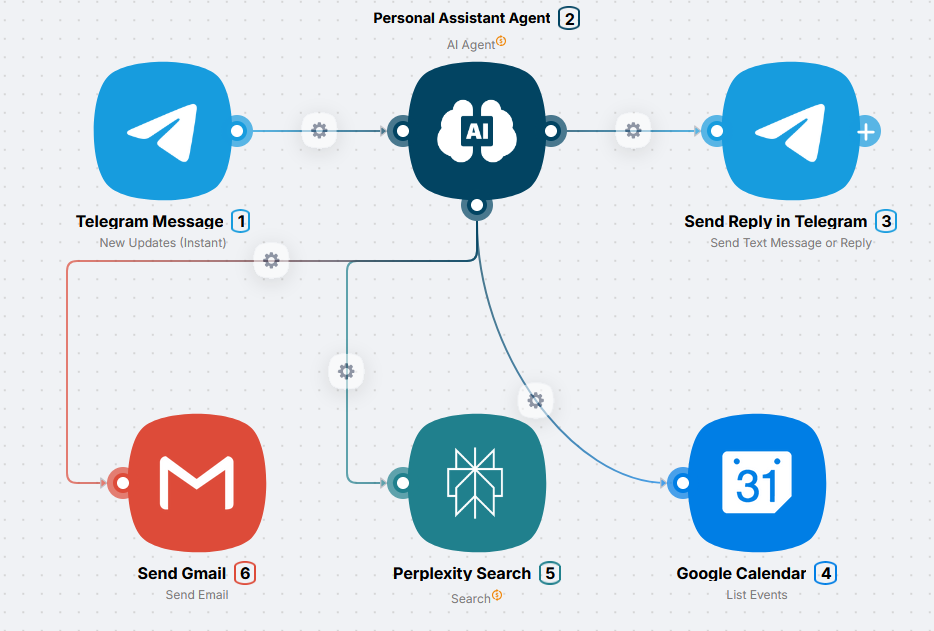
The user writes a task in free form (e.g. "schedule a meeting and get a company overview"). The agent picks which tools to call and in what order, then replies in the chat with a single coherent message.
5. Multi-agent scenarios
Works for large tasks that split naturally into multiple roles (research, writing, design, review, etc.): one orchestrator agent assigns subtasks and collects results from sub-agents or specialized branches.
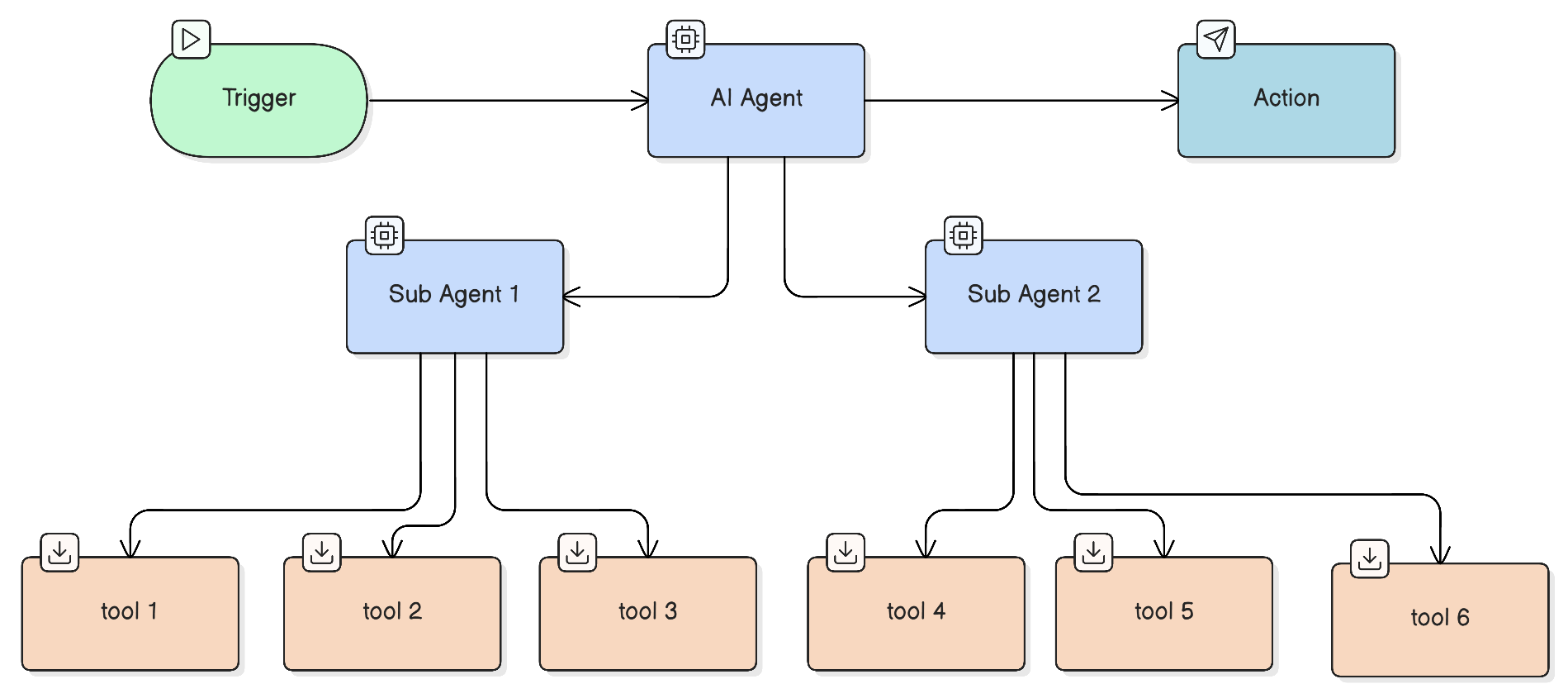
This approach works best for the most complex tasks: each sub-agent is narrowly specialized and operates only within its own area. If you give one agent several roles at once - say, research, copywriting, and fact-checking - it can lose context or handle each role poorly. Split into three specialized agents and each one executes precisely within its competence.
It is best to get comfortable with a single agent (section 4) first, and only then move on to more complex structures with agent orchestration.
Example scenario
Automated content factory
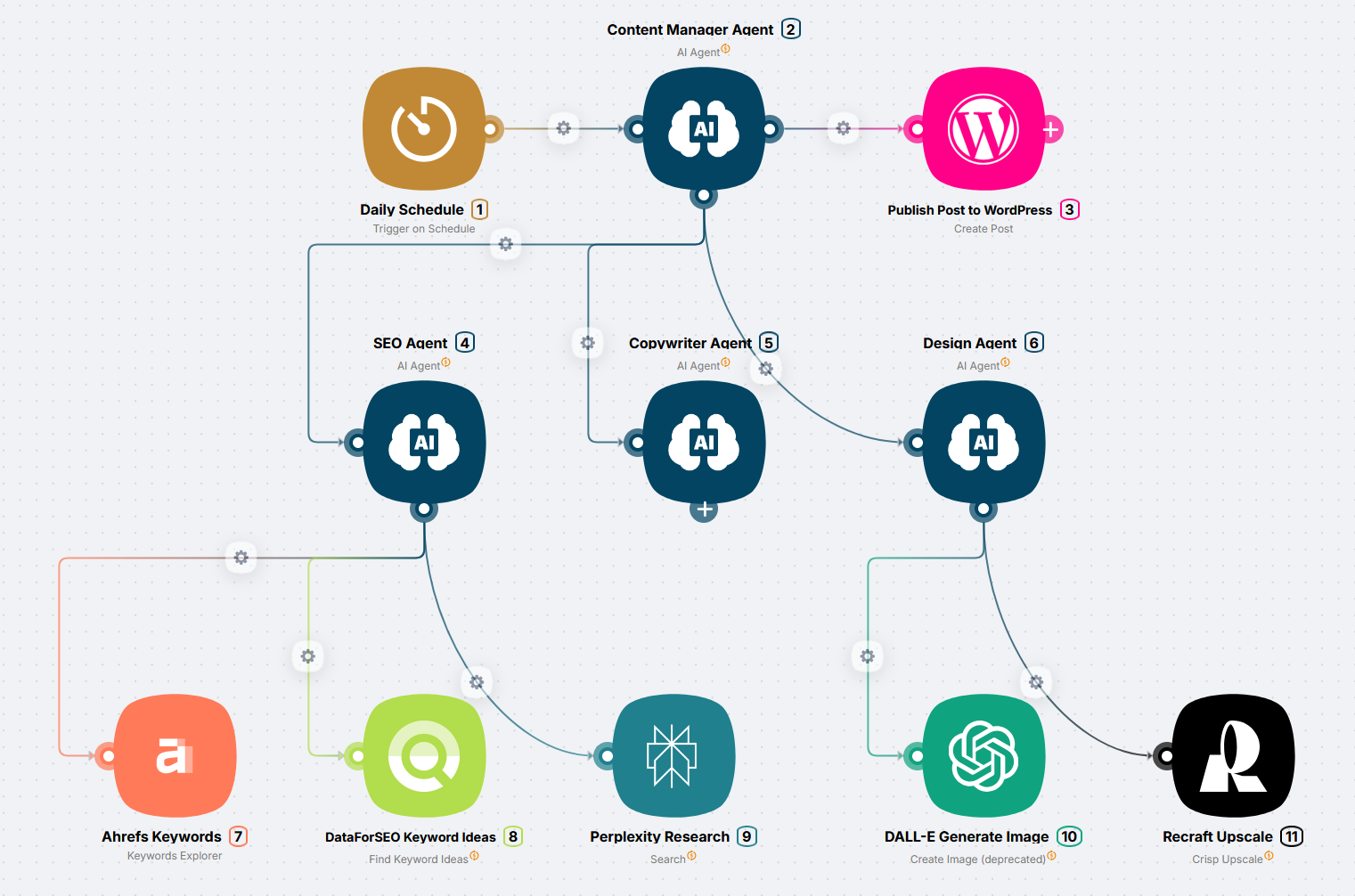
On a schedule the orchestrator agent distributes tasks to sub-agents: one writes the copy, another creates the cover image, a third publishes. Each handles its part, and the result goes to the site.
How to choose a scenario type
| Your task | Best type | Complexity |
|---|---|---|
| Always the same sequence | Linear | Low |
| Clear conditions (amount, country, category) | Conditional | Medium |
| Complex conditions (tone, intent, meaning) | AI-based routing | Medium |
| AI decides which actions to take | Agent with tools | High |
| Very complex task, multiple "experts" | Multi-agent system | Very high |
What's next?
Start simple:
Or plan your scenario first:
If the app or action you need isn't available
How to connect any service via HTTP Request or JavaScript when there is no ready-made integration or a specific action is missing
Publishing a scenario and version history
How to move a scenario from development to production, manage the active state, and roll back to previous versions
Need Help? Ask the community
If something on this page is missing or unclear, post on the Latenode community forum. Our team and other users usually reply quickly.