
Webhook Response
Node Description
Webhook Response is an action node that generates a response to a request sent to the Trigger on Webhook node.
If a plain 200 OK is enough, you do not need the Webhook Response node: Trigger on Webhook replies on its own. With this node, the HTTP response is held until the node runs, so if the run is queued because of the parallel execution limit, the sender may time out before receiving it. You can also return an instant reply without this node by using webhook URL parameters.
Node Configuration
To configure the Webhook Response node, you need to fill in both required and optional fields.
The only required***** field is:
- Status.
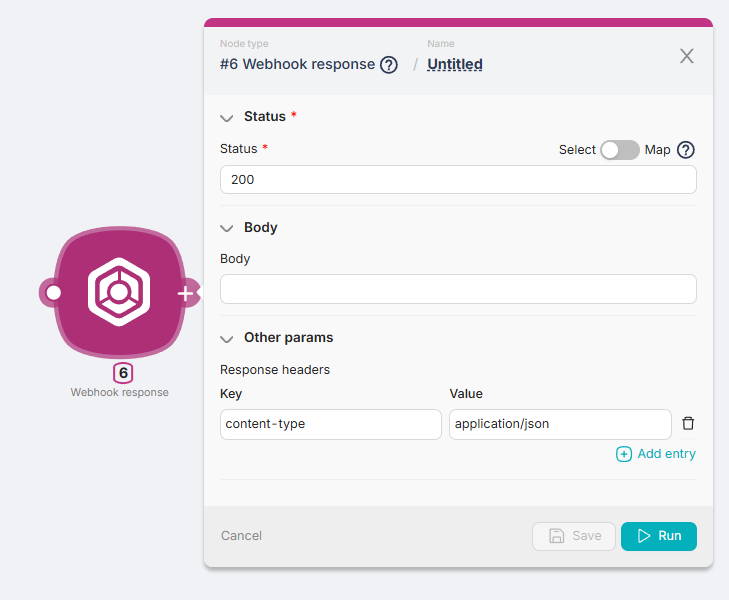
Status
This field is used to input the response code to the request from the previous node. For example, a response code like 200.
Body
The response field generated by the Webhook Response node when it receives a response code from the Status field of the previous node.
In the Body field, you can input text, variables from other nodes, or response parameters from other nodes.
Other Params
A section of fields for filling in response headers:
- Key - a field to enter additional information about the response, such as the format, e.g., content-type;
- Value - a field to enter the value of additional information about the response, such as the format value, e.g., application/json.
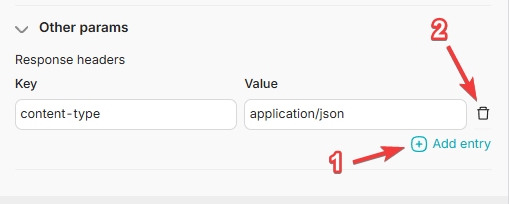
To add a new Key-Value pair, you can use the Add a header button (1). To remove a Key-Value pair, you can use the Remove button (2).
Convert File Base64 and Binary
Convert a file between Base64 and binary in a scenario.
Wait
Introducing delays in scenario execution
Need Help? Ask the community
If something on this page is missing or unclear, post on the Latenode community forum. Our team and other users usually reply quickly.